Portable Power Station Overheating: What to Do (And How to Prevent It)
🔍 Quick Answer
If your portable power station feels hot, shows a temperature warning, or its fan is running constantly under load, stop using it immediately: power it off, unplug every connected device, and move it to a cool, well-ventilated spot away from direct sunlight. Let it cool down on its own — never use water, ice, or a fan blowing directly on it to speed up cooling. If you notice a burning smell, chemical odor, swelling, or smoke, that’s a different situation entirely: unplug everything, move away from the unit, and do not attempt to open, move, or use it again. Most overheating incidents are caused by blocked vents, overloading, direct sun exposure, or charging in extreme heat — all of which are preventable with a few habits covered below.
Why Portable Power Stations Overheat in the First Place
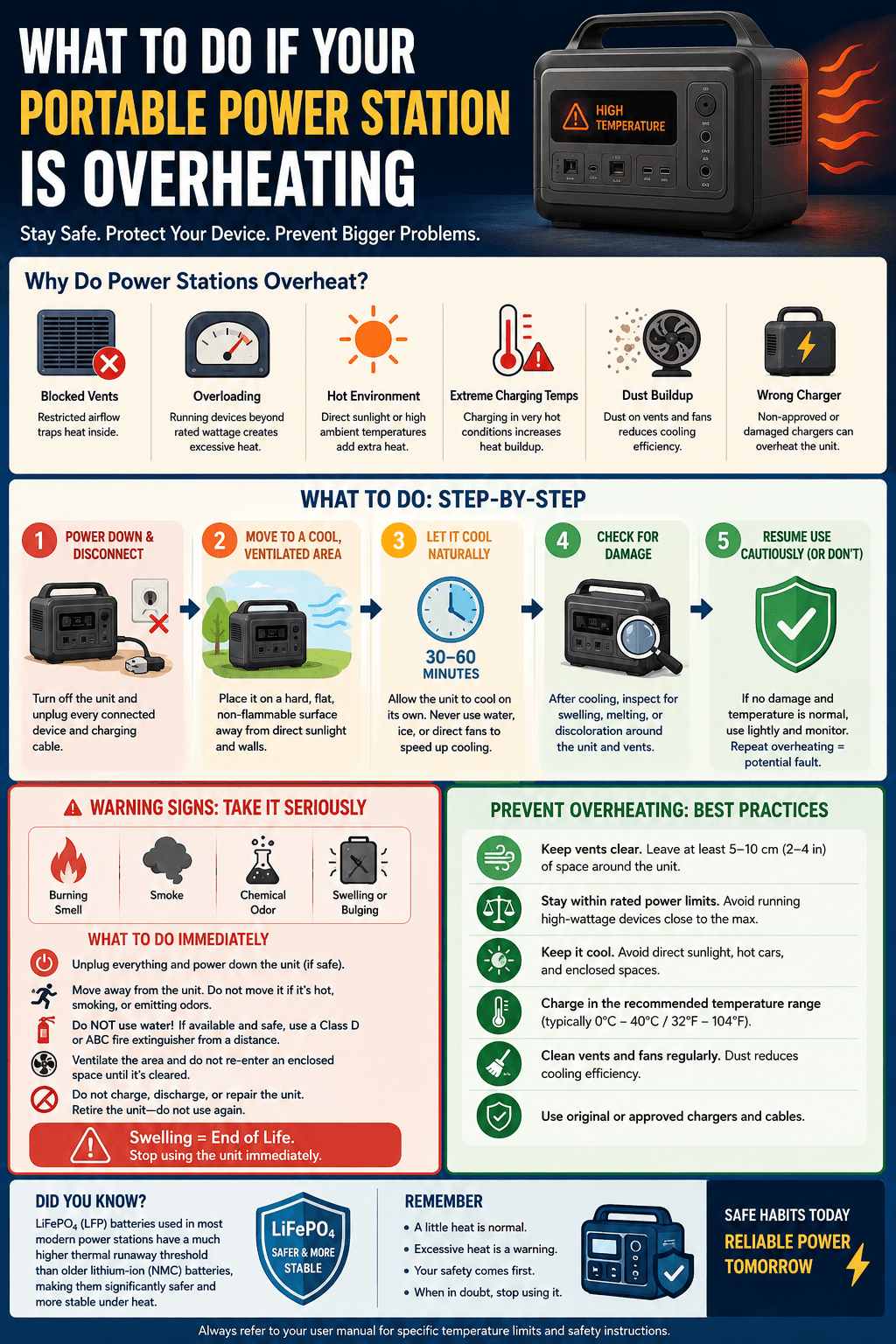
Every portable power station generates heat as a normal part of operating — the inverter, the battery cells, and the charging circuitry all produce warmth under load. A well-designed unit is built to manage that heat through ventilation, cooling fans, and a Battery Management System (BMS) that actively monitors temperature. Overheating becomes a problem when heat generation outpaces the unit’s ability to dissipate it. The most common causes:
- Blocked or obstructed vents — placing the unit against a wall, inside a bag, or under bedding restricts airflow and traps heat.
- Overloading the output — running appliances that draw close to or above the unit’s rated wattage forces the inverter to work harder and generate more heat than normal.
- Direct sunlight or hot environments — charging or using the unit in a hot car, on a sunny picnic table, or in an unventilated shed adds ambient heat on top of the unit’s own output.
- Charging in extreme temperatures — most lithium batteries have a narrower safe charging temperature range than their operating range, and pushing a fast charge in very hot conditions compounds heat buildup.
- Dust buildup on vents and fans — over months of use, dust accumulation restricts airflow even when nothing is physically blocking the unit.
- Using a damaged or non-approved charger — an incompatible charger can deliver current the unit’s circuitry isn’t designed to handle cleanly.
What to Do If Your Power Station Is Overheating
Step 1: Power Down and Disconnect Everything
Turn off the unit and unplug every connected device and charging cable. Don’t wait to see if it cools down on its own while still under load — removing the load is the fastest way to reduce heat generation.
Step 2: Move It to a Cool, Ventilated Location
Relocate the unit away from direct sunlight, away from walls or enclosed spaces, and onto a hard, flat, non-flammable surface. A garage floor, tile, or concrete works better than carpet, bedding, or a wooden table in this situation.
Step 3: Let It Cool Naturally
Give it time — don’t rush the process. Never pour water on it, pack it in ice, or point a fan directly at the vents to force rapid cooling; rapid temperature swings can stress battery cells and electronics in ways that slow, passive cooling avoids. Most units return to a safe operating temperature within 30–60 minutes once removed from load and heat exposure.
Step 4: Check for Physical Signs of Damage
Once it’s cooled, inspect the casing for any swelling, warping, or discoloration, and check the vents for melted plastic or discoloration around the fan housing. If you see any of these signs, don’t resume normal use — treat it as a hardware issue rather than a one-off heat event.
Step 5: Resume Use Cautiously (or Don’t)
If the unit shows no physical damage and returns to a normal temperature, you can typically resume light use, but pay attention to whether the same overheating happens again under similar conditions. A repeat pattern under normal loads is a sign the unit itself may have a fault — not something to keep working around.
When It’s More Serious: Burning Smell, Smoke, or Swelling
This is a different category of problem, and it should be treated differently than routine overheating:
- Unplug everything immediately and power down the unit if it’s safe to reach the switch.
- Move away from the unit rather than continuing to handle it — don’t attempt to move it to “somewhere safer” if doing so means carrying it while it’s actively smoking or hot to the touch.
- Do not use water on a lithium battery fire or suspected battery issue — lithium battery fires can react unpredictably with water, and this is not a DIY-extinguish situation. If you have a Class D or ABC fire extinguisher rated for the situation and it’s safe to do so from a distance, that’s a better option than water; if not, prioritize getting people clear of the area.
- Ventilate the area if there’s a chemical odor, and don’t re-enter an enclosed space until it’s cleared.
- Don’t attempt to charge, discharge, or repair the unit afterward. A battery that has shown signs of thermal distress should be retired, not returned to service, even if it appears to recover.
Swelling in particular is a sign of internal gas buildup within the battery cells and should be treated as an end-of-life signal for that unit, not something to monitor and continue using.
Why This Matters More for Some Battery Chemistries Than Others
Not all lithium batteries behave the same way under heat stress. LiFePO4 (LFP) batteries — used in most modern power stations, including every model we’ve reviewed on this site — have a notably higher thermal runaway threshold than older lithium-ion (NMC) chemistries, meaning they’re significantly less likely to reach a dangerous heat cascade in the first place. This is a big part of why LFP has become the standard for home backup and daily-use power stations rather than a niche upgrade. If you’re deciding between chemistries or have an older lithium-ion unit, our full breakdown in Lithium-ion vs. LiFePO4 covers the safety and longevity tradeoffs in depth.
That said, a stable battery chemistry reduces risk — it doesn’t eliminate the need for basic overheating precautions. Blocked vents and overloading can still push even an LFP unit into a heat-related shutdown; it’s just far less likely to escalate into the kind of serious event associated with older chemistries.
How to Prevent Overheating in the First Place
- Keep vents clear. Don’t operate your unit inside a bag, under bedding, or pushed against a wall. Give it open air on at least the side where the vents and fan are located.
- Don’t run loads near the unit’s ceiling for extended periods. If you’re regularly pushing close to the rated continuous wattage, you’re generating more sustained heat than the unit is comfortable with long-term — sizing up to a higher-output unit is the better fix, not pushing the smaller one harder. Our sizing calculator can help you confirm you’re in the right capacity range for what you’re actually running.
- Avoid direct sunlight during use and charging. A hot car interior or direct midday sun can add significant ambient heat on top of the unit’s own output — shade matters more than people expect.
- Charge in moderate temperatures when possible. If you’re charging via solar in extreme heat, keep an eye on the unit rather than leaving it unattended in direct sun for a full charge cycle. For solar-specific charging guidance, see How to Connect Solar Panel to Power Station and Best Time of Day to Charge Power Station With Solar — charging during cooler parts of the day reduces heat stress considerably.
- Clean vents periodically. A soft, dry cloth or a can of compressed air on the vent openings every month or two prevents dust buildup from quietly reducing airflow over time.
- Use the charger that came with the unit, or a manufacturer-approved replacement — mismatched chargers are a real, avoidable risk factor.
- Don’t ignore a persistently loud or constantly running fan. This is often the earliest warning sign that a unit is working harder than it should be under your current load and environment. If fan noise itself is what’s concerning you, our guide on Why Does My Portable Power Station Fan Make Noise? breaks down normal versus concerning fan behavior.
Indoor Use and Overheating Risk
Using a power station indoors is generally safe with proper precautions, but enclosed indoor spaces make ventilation more important, not less. If you’re planning to run a unit indoors for extended periods — home backup during an outage, for example — our guide Are Portable Power Stations Safe Indoors? covers placement and ventilation considerations specific to indoor use in more depth.
Cold Weather Isn’t the Only Temperature Risk
Most people associate battery safety concerns with cold weather affecting performance, but heat is the more acute overheating risk. If you’re using your unit in both hot summer conditions and cold winter storage, it’s worth understanding both ends of the temperature range — our guide on How Cold Weather Affects Portable Power Station Performance covers the opposite end of the spectrum, including why extreme cold and extreme heat both push a battery outside its comfortable operating window, just in different ways.
Frequently Asked Questions
Is it normal for a portable power station to feel warm during use?
Yes — mild warmth during charging or while running a load is completely normal. The concern threshold is when it feels genuinely hot to the touch, the fan is running constantly at high speed, or you see a temperature warning on the display, not general warmth.
Can a portable power station explode from overheating?
It’s extremely rare, especially with modern LiFePO4 units, but not impossible under severe conditions — physical damage, using an incompatible charger, or ignoring repeated overheating warnings all increase risk. This is exactly why the built-in BMS and overheat protection exist, and why you shouldn’t disable or bypass those protections.
What should I do if my power station shuts off due to overheating?
Don’t immediately restart it. Let it sit, powered off and disconnected, in a cool ventilated spot for at least 30–60 minutes before attempting to use it again, and address whatever caused the overheating (blocked vents, an overloaded circuit, direct sun) before resuming the same usage pattern.
Is it safe to charge my power station overnight?
Most modern units with proper BMS protection are designed to handle overnight charging safely, but it’s still worth charging in a ventilated area rather than under bedding or inside an enclosed cabinet, and avoiding overnight charging in unusually hot rooms.
Does overheating permanently damage the battery, even if it recovers?
Repeated heat stress can accelerate long-term capacity loss even if the unit appears to recover fully each time. A one-off overheating event from a blocked vent isn’t likely to cause lasting damage once corrected, but a pattern of repeated overheating is worth addressing at the root cause rather than treating each incident as isolated.
This guide covers general safety practices for portable power stations. Always follow your specific model’s manual and manufacturer guidance, which may include model-specific temperature thresholds and safety procedures.

Hi, I’m Andrew Richards. I created PowerStationPick to share what I’ve learned about portable power through real-world use—what actually works, what doesn’t, and what makes sense for different situations. I focus on helping you choose the right setup for home backup, camping, and everyday needs without overcomplicating things.